Screen Views
The first screen view, Location Information, contains most of the fields to document the site's location. The following are definitions to assist you in completing the fields.
Location Information
Location Information Screen View
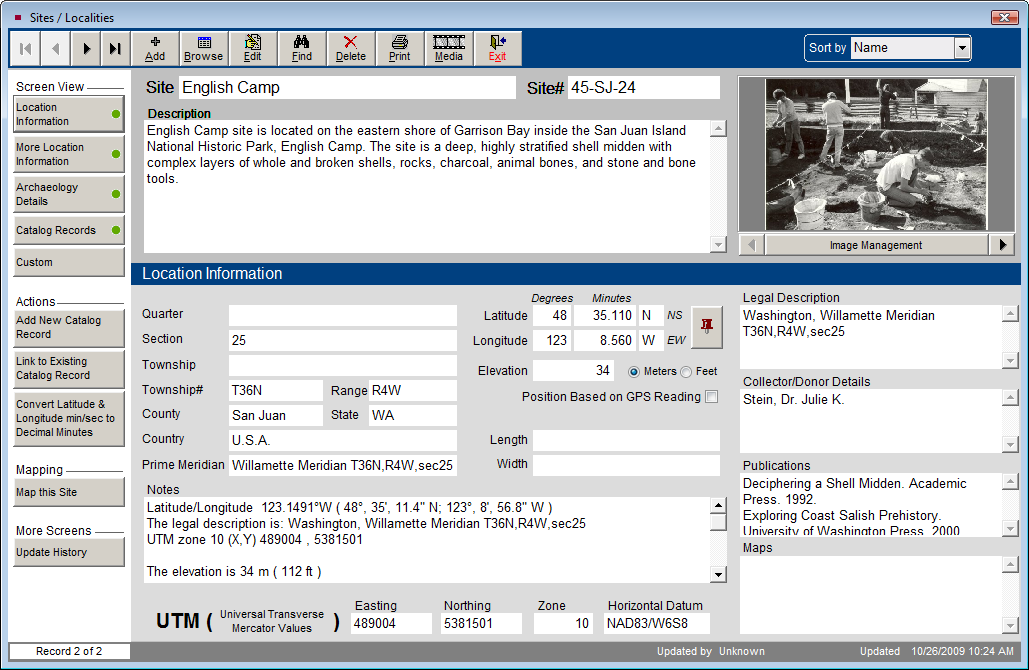
Quarter - The intersection of Range lines and Township lines define 6 by 6 mile squares called Townships, which are divided into 36 sections. These sections are broken into quarters.
Section -The intersection of Range lines and Township lines define 6 by 6 mile squares called Townships, which are divided into 36 sections. These are normally 1 by 1 mile squares, but some are altered to correct for the spherical earth.
Township - Townships are named in reference to a principal meridian and a baseline. Townships occur at 6 mile intervals east and west of a principal meridian. T2N refers to Township 2 North of the baseline. Township values are normally whole numbers starting at 1, but some exceptions occur. Township lines are normally adjusted every 4th line to correct for the spherical nature of the earth. These are called standard parallels.
Range - Ranges are 6 mile strips of land marked off by lines parallel to a principal meridian. Ranges occur north and south of a baseline that is associated with each principal meridian. Range values are normally whole numbers starting at 1, but some exceptions occur. They are numbered east or west of the principal meridian. R2W refers to Range 2 West of the meridian. Range lines are normally adjusted every 4th line to correct for the spherical nature of the earth. These are called guide meridians.
County - County is defined as a land area of local government in the United States, United Kingdom, Australia, New Zealand, in some Canadian provinces, and other countries. If county is not used as the government unit, you may enter the division, municipality, or regional district in this field. Or, you might use one of the custom fields for this information.
State - Please enter a two digit abbreviation for the state or province.
Country - Please enter the country in which this site is located.
Prime Meridian - Enter the prime meridian from which longitudinal measurements have been taken. The prime meridian is the meridian of zero longitude. The Greenwich Meridian was chosen as the Prime Meridian for international use at the International Meridian Conference, Washington, D.C., United States, 1884. The site may be measured using another principal meridian, such as the Willamette Meridian upon which land surveys in Oregon and Washington are based.
Latitude - Lines of Latitude are the horizontal lines shown running east to west on maps. They are angular measurements in degrees ranging from 0 degrees at the equator to 90 degrees at the poles.
Longitude - Lines of Longitude run north to south. Longitude is the angular distance measured east or west from the prime meridian to the meridian passing through another position on the earth's surface. They are usually expressed in degrees (or hours), minutes and seconds. Enter the degrees and decimal minutes in this field.
Length - Enter the approximate length of the site.
Width - Enter the approximate width of the site.
Elevation - Enter information about the highest point of the site, using the radio button to indicate meters or feet.
Position Based on GPS Reading - Check this box to indicate if the measurements were taken from a Global Positioning System reading.
Universal Transverse Mercator Values (Easting, Northing, Zone, Horizontal Datum) - The UTM coordinate system was developed by the US Army Corps of Engineers in the 1940s. It is a grid-based method of identifying locations, which differs from the traditional latitude and longitude system.
The UTM divides the earth into 60 zones each 6 degrees of longitude wide. These zones define the reference point for UTM grid coordinates within the zone. UTM zones extend from a latitude of 80 degrees South to 84 degrees North. Zones are numbered 1 through 60, staring at the international date line, longitude 180 degrees, and proceeding east. Zone 1 extends from 180 degrees to 174 degrees West and is centered on 177 degrees West.
Each zone is divided into horizontal bands spanning 8 degrees of latitude. These bands are lettered, south to north, beginning at 80 degrees South with the letter C and ending with the letter X at 84 degrees North. The letters I and O are skipped to avoid confusion with the numbers one and zero. The band lettered X spans 12 degrees of latitude.
A square grid is superimposed on each zone. It is aligned so that the vertical grid lines are parallel to the center of the zone, called the central meridian.
UTM grid coordinates are expressed as a distance in meters to the east, referred to as the "easting," and a distance in meters to the north, referred to as the "northing."
UTM Easting coordinates are referenced to the center line of the zone known as the central meridian. The central meridian is assigned an easting value of 500,000 meters East.
UTM Northing coordinates are measured relative to the equator. For locations north of the equator, the equator is assigned a value of 0 meters North. To avoid negative numbers, locations south of the equator are made with the equator assigned value of 10,000,000 meters North.
Horizontal Datum - A datum describes the model that was used to match the location of features on the ground to coordinates and locations on a map. Every map that shows a geographic coordinate system like UTM or Latitude and Longitude with any precision will also list the datum used on the map.
Legal Description - Enter a description of the site that is complete and specific enough for an independent surveyor to locate and identify it. This is an unlimited text field.
Collector/Donor Details - Enter the name of the person or people who supervised the project or excavation of the site. Names should appear as Last name, First name.
Publications - List any publications about the site, or in which artifacts recovered from the site are published.
Maps - List any maps in your collections that pertain to the site.
More Location Information
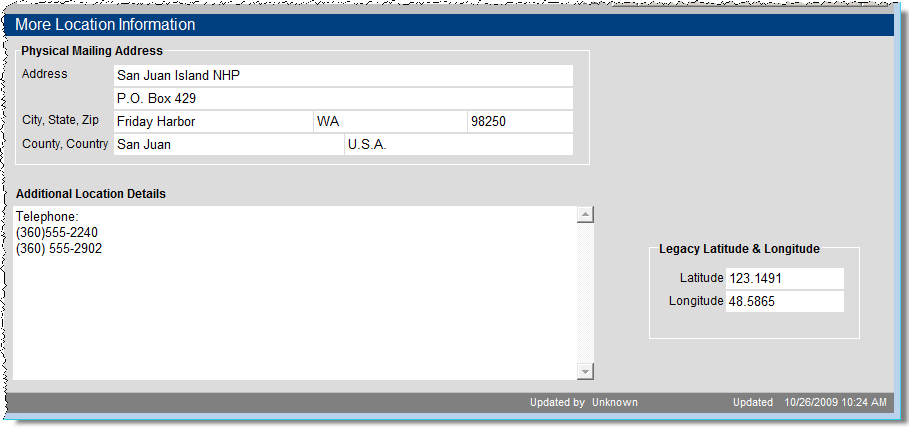
The More Location Information screen contains such fields as the Physical Mailing Address, Additional Location Details, and Legacy Latitude & Longitude for the site. The Legacy Latitude and Longitude fields are where these values may be entered as text. The Latitude and Longitude fields in the Location Information screen require numeric digits.
More Location Information Screen View
Archaeology Details
The Archaeology Details screen enables you to enter information about the project, the collection and materials discovered at this site.
Archaeology Details Screen View
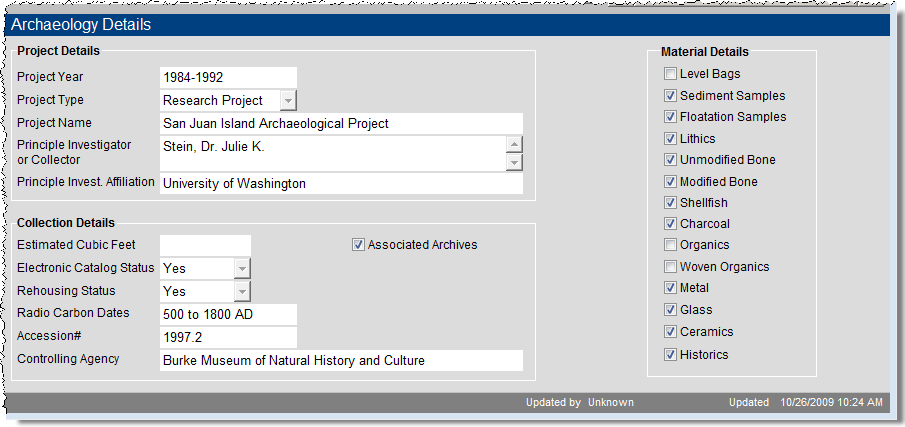
In Project Details, you can record the project's year, type, name, principle collector, and the principal collector's affiliation.
In Collection Details are fields for an estimated collection size, status for electronic cataloging, status for rehousing, radio carbon dates, accession number and controlling agency.
The Material Details section provides check boxes to describe materials found at this site.
Catalog Records
The Catalog Records screen view shows the catalog records associated (linked) with this site. The data appears in a grid format. At the top right of the grid, the plus sign button enables you to add catalog records for this site. The file folder icon button opens a catalog screen where you can view more information about each item. At this catalog screen, you can then view the full catalog record, add a detailed condition report, set up multimedia links and change the catalog.
Custom
The Custom screen view contains 11 user defined fields, which you can name by going to the Main Menu | Setup | Custom Fields and selecting the Sites & Localities screen in the Sidebar. You can also name the Custom screen view button in Sites & Localities from this Setup screen.