
If you need reports that include records from the Objects, Photos, Archives, and Library catalogs on one report, PastPerfect has predefined reports to help you. These reports are found by clicking the All 4 Catalogs button under Report Types.
All 4 Catalog Reports
These reports may have ranges where you can select the records included on the report, similar to the Catalog Detail and Summary reports. For example, the Collection List report will print Objects, Photos, Archives, and Library records, and you can use the Object ID, Object Name, Collection, Status, and Home Location fields to narrow the records from those catalogs included on the report. If you would like all of the Object, Photo, Archive, and Library items in the Main Building to appear on the report, enter "Main Building" in the Home Location To and From fields, as below.
Collection List Report
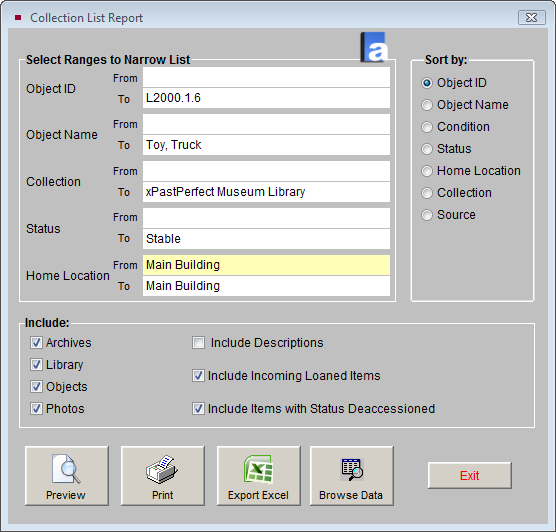
On the Collection List Report screen, you can also include or not include catalogs and items by checking the appropriate boxes. You may include the description of each item by clicking the Include Descriptions box. You may select the sort order of the records on the report by choosing a Sort by field.
The Report Output Options are the same as they are in the Catalog Detail and Summary reports, as described earlier in this chapter.