Fixed Lists
Since the Fixed Lists are fairly simple, we will examine them first. The Fixed Lists will always display on this screen, no matter what folder is selected under User Defined List Folders. They cannot be locked or made private. The number of records on each list displays to the right of the list name, as seen below. The records on the lists are updated every time you view this screen.
Fixed Lists
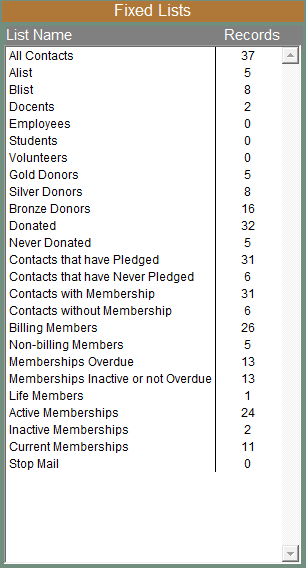
TIP: To view an explanation of a list and to get the filter statement used to create the list, right click on the list.
All Contacts - This is the list of all contacts.
A List and B List - These lists can be renamed by going to the Main Menu | Setup | Custom Fields | Contacts. Contacts are placed on this list by checking the appropriate box on the contact screen.
Docents, Employees, Students and Volunteers - Contacts are placed on these lists by checking the appropriate box on the contact screen.
Gold, Silver and Bronze Donors - PastPerfect will automatically place donors on these lists based on their total amount of donations. Donation amounts for each level are set by going to the Main Menu | Setup | Contacts | General Information.
Donated and Never Donated - If a contact has ever made a donation, that contact is automatically placed on the Donated list. If the contact has not made a donation, the contact is on the Never Donated list.
Contacts that have Pledged and Contacts that have Never Pledged - If you have entered a pledge for a contact, he/she will be on the Contacts that have Pledged list. If a contact has not made a pledge, he/she will be on the Contacts that have Never Pledged list.
Contacts with Membership and Contacts without Membership - If a contact is a member (or has been a member), he/she will be on the Contacts with Membership list. The memberships do not need to be paid up or active to be on this list. This is the total count of all contacts with memberships. If one membership has three associated contacts, each contact will be counted. If a contact has not joined as a member, he/she will be on the Contacts without Membership list.
Billing Members and Non-billing Members - Each membership has one member designated as the Bill to Member. On this membership record, you will see a "Yes" for the statement "This is the Bill to Member."
Billing Members section of the Membership screen
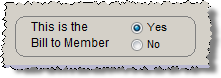
Any contact with "Yes" will be on the Billing Members list. This list would be used for sending newsletters or renewals to members, since it includes just one person per membership. You will send one piece for each membership. All the other contacts who are members, but are not the Bill to Member, will be on the Non-billing Members list. The number of members on these two lists, when added together, will equal the number of Contacts with Membership.
Memberships Overdue and Memberships Inactive or Not Overdue - Memberships Overdue is all the Billing Members who are Active, and are overdue as of today and are not Life Members. On their membership records, they are set to "Yes" for the statement "This is the Bill to Member," they are set to "Yes" for the question "Include on Overdue List," and their Paid Thru date is earlier than today's date.
Overdue List section of the Membership screen
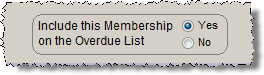
When sending overdue notices to members, this is often the list you will use.
The Memberships Inactive or Not Overdue list contains Billing Members who are Inactive or memberships that are paid up through today, or are Life Members. Contacts on this list may be Active or Inactive members. The number of members on these two lists, when added together, will equal the number of Billing Members. These lists are updated automatically.
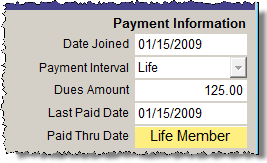
Life Members - These are the members who have their payment interval set to "Life" on their membership records. These members can be excluded as a group from lists and mailings (i.e. renewals).
Payment Interval on the Membership screen
Active Memberships and Inactive Memberships - Memberships that have "Yes" to answer the question "Include on Overdue List" on their membership screen will be on the Active Memberships list.
Overdue List section of the Membership screen
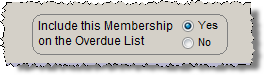
Memberships which have "No" set to the question "Include on Overdue List" on their membership screen will be on the Inactive Memberships list. These lists are not automatically based on membership expiration dates.
Current Memberships - These are Billing Members who are paid up as of today, or are Life Members. This list is updated automatically.
Stop Mail - All contacts who have the Stop Mail box checked on their contact records will be on this list.
Stop Mail section of the Contact screen
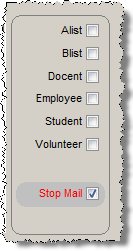
Lists, letters, labels, envelopes, and emails will not be generated for these contacts, unless you specifically tell the program to include them.