Global Update
The Global Update screen allows you to make changes to many catalog records at once and is available from the Utilities drop-down menu. Due to the possibility of detrimental changes or deletion of data, access to this screen should be limited. Warning: Before performing any global change you should back up your data.
The first step in making a global update is to select the data table where you want to make the change from the Select Table list, seen below. The list of fields will be updated based on the table you select. Next, select the field from the Click to Select Field list by clicking once on the field. You will now enter the text as it appears in the field that you want to change in the Search for box. PastPerfect will look for the string of characters you enter, character by character. In the box labeled Replace with, enter the text exactly as you want it to appear in your data. Warning: Every record with the Search for string of characters in the selected field will be changed.
Let's say, you have a Two Rivers Collection which is spelled "Too" in a number of records. By entering "Too" in Search for and "Two" in Replace with, you will change "Too Rivers" to "Two Rivers" for this collection. However, be careful as you will also change your "Tool Collection" to "Twol Collection," and your "John Smith Cartoon Collection" to "John Smith Cartwon Collection."
If you want to overwrite the Search for text with blank data, leave the Replace with box empty.
Global Updates screen
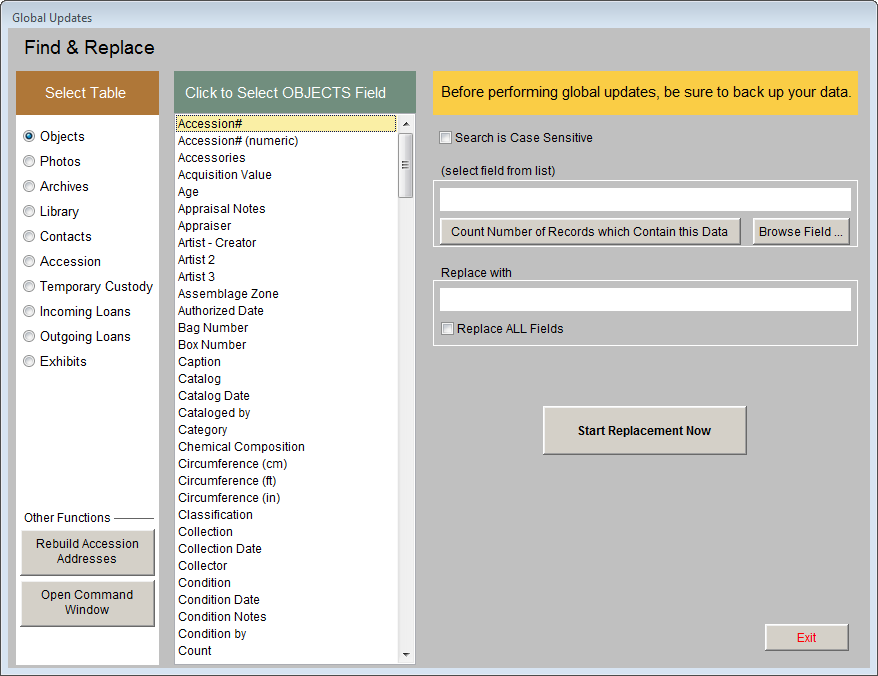
You may want to click the Count Number of Records which Contain this Data button to give you an indication of the scope of the change.
If you want to replace the selected field in all records with the Replace with entry, put a check in the box labeled Replace ALL Fields. If there is no check in that box then only records whose current data in the selected field matches your entry in the Search for field will be replaced.
Finally, click Start Replacement Now to make the change.
Rebuild Accession Addresses - Clicking this button will update the address, phone, email, and website information in the Accession file from the associated contact's information in Contacts. We generally do not recommend performing this global change.