Buttons in Edit Mode
Changing Numbers - By design, PastPerfect has made it difficult to change the Object ID number, Accession number, and Incoming Loan number. This is something that you do not want to do by mistake. To change these numbers, you must first click the Edit button in the Navigation Bar to display the following options:
Change Accession#, Incoming Loan # or Object ID

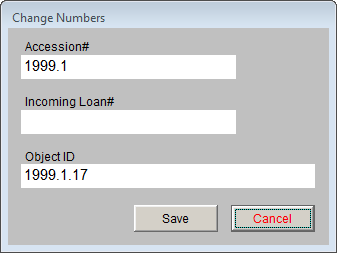
Click Change Access#, Object ID, or Loan# to open the Change Numbers screen, seen above where you can type in the new numbers. Click Save to complete the change and Save again to exit Edit Mode.
Deaccession - Another Edit option is Deaccession. To remove an object from the collection and place it in the Deaccession file, click Edit and then the Deaccession button. For more information on the deaccession process, please read Chapter 5 - The Accession Process.
Change Catalog - During the course of cataloging objects, a cataloger may accidentally catalog an item and then realize that item should have been placed in a different catalog. Rather than simply deleting the item and re-entering the data in its proper catalog, you may use the Change Catalog button from the Edit options.
Change Catalog screen

From this screen you may select the correct catalog for the item and click OK. This will move the catalog record to the other catalog and mark the copy in the current catalog for deletion. Note the large yellow warning box near the top of the catalog screen. The record in the original catalog will be sent to the Recycle Bin and will no longer be displayed. Because each catalog contains different fields, not all data may be transferred to the new catalog. We suggest printing a copy of your record before using the Change Catalog function.