
Adding New Outgoing Loan Records
Each outgoing loan must have a unique loan number to identify the loan. The loan number is a numeric field, so it may only contain whole numbers. PastPerfect will display the last loan number added and will suggest the next number. We recommend that you allow PastPerfect to assign these numbers.
Before adding a new outgoing loan, we recommend you enter the borrower into Contacts, although it is not required. When you select the borrower from Contacts, basic contact information will automatically carry over to the Contact Information & Notes Accordion on the Outgoing Loan record.
Add New Outgoing Loan Record
1.Click "New Record" on the Outgoing Loans Query screen or on an existing Outgoing Loan record
2.Populate the required fields: Loan No and Loaned To
•Duplicate loan numbers are not permitted.
•Click the down arrow for Loaned To and begin typing the borrower's name. If the borrower exists in Contacts, you will be able to select the borrower's name listed next to their ID number. If the borrower is not in Contacts, you can type in the name and press "Enter."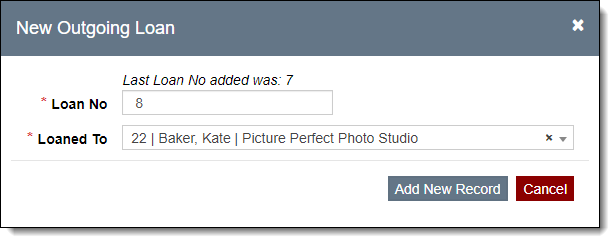
3.Click "Add New Record"
4.Populate other fields if desired
•It is recommended to populate the Description of Items field so it can be printed on the Loan Agreement
5.Click "Save" in the Edit Bar at the top of the screen