Export Catalog List
Catalog Lists may be exported to CSV or to a map data file (.KML), which
can be imported into mapping programs.
Export to CSV
When you export a catalog list to CSV, you have the option to include
standard fields, which are pre-set, or extended fields, which are user-selected.
- Click the List Name on the Catalog Lists Query screen
- Click "Export to CSV" at the top of the Individual List
screen
- Select which field option you want to export: Standard Field List
or Extended Field List
- If you select Extended Field List, choose which fields you want
to export:
- To add a field to the export, select the field in the Field
List column on the left, then click the right arrow. The field
will move to the Fields to Export column on the right.
- To remove a field from the export, select the field in the
Fields to Export column on the right, then click the left arrow.
The field will move to the Field List column on the left.
- To change the order of the fields in the Fields to Export column,
click a field and drag it up or down into the desired position.
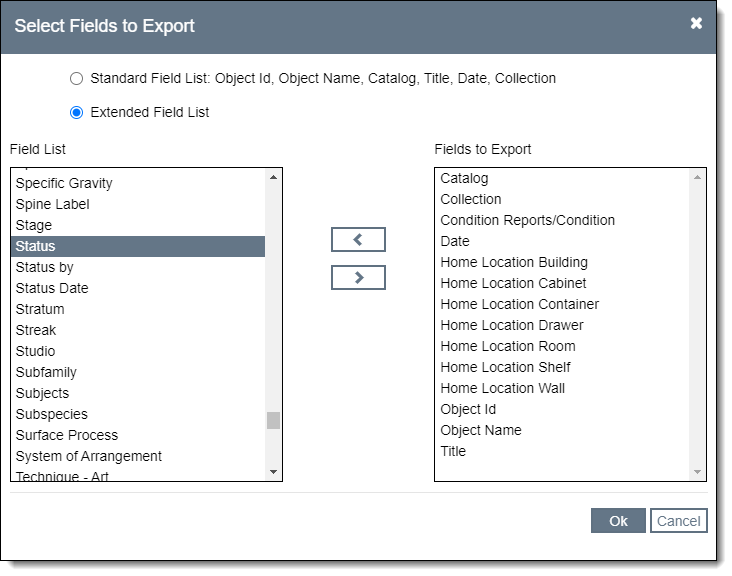
- Click "Ok" to complete the export
- The CSV file will download. You can open and view the file in Excel.
Export Mapping Data
If you have populated latitude and longitude fields for your catalog
records, you may wish to use those coordinates in a mapping program. This
export process creates a map data file (.KML), which can be imported into
mapping programs. The KML file contains basic identifying fields as well
as the latitude and longitude coordinates for the records on a catalog
list.
- Click the List Name on the Catalog Lists Query screen
- Click "Export Mapping Data" at the top of the Individual
List screen
- The KML file will download. You can then import the file into a
mapping program. See your mapping program for details on how to import.