
Letter & Email Templates
Letter & Email Templates, under Settings | Contact Settings, allows you to create mail merge letters and emails. You can send these documents to one individual contact or use them for a bulk mailing. These templates may be used for membership renewal letters, donation solicitations, meeting announcements, invitations, membership campaigns, etc. (Please note: there are separate documents for Donation Thank You Letters, an In-Kind Gift Thank You Letter, a Pledge Thank You Letter, and a Pledge Reminder Letter.)
PastPerfect uses document templates for mail merge letters and emails. These templates allow you to create the layout and basic text for a document, and you can insert field place holders that will populate automatically when you print.
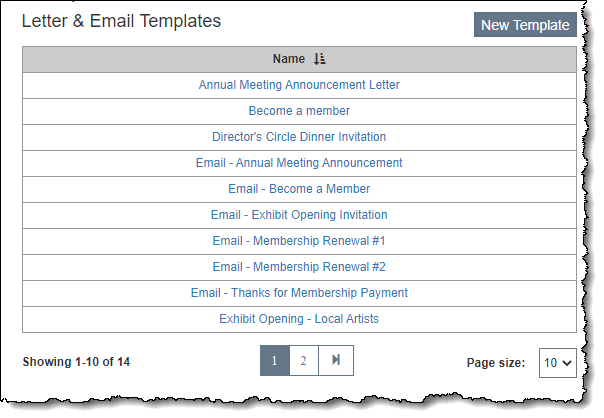
Add New Letter/Email Template
1.Click the "New Template" button on the Setup Contacts screen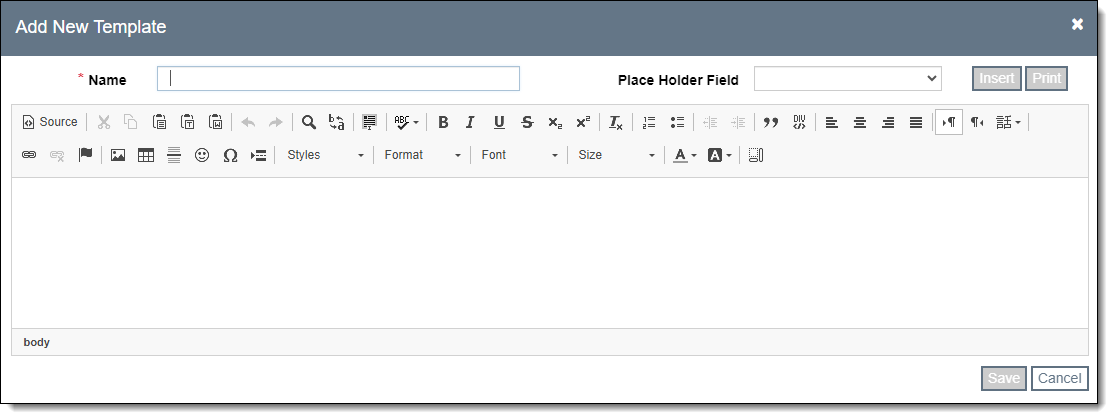
2.Type a unique name for the letter template in the Name field at the top
3.Put in your text and insert any fields you wish to include
•See Letter/Email Template Modifications for additional details about working with templates.
4.Click "Save"
Edit Letter/Email Template
1.Click the name of the letter template on the Setup Contacts screen
2.Make your edits
•See Letter/Email Template Modifications for additional details about working with templates.
3.Click "Save"
Delete Letter/Email Template
1.Hover over the template name that you want to delete on the Setup Contacts screen
2.Click the Trash Can icon on the right side
3.Click "Yes" to confirm