
Public Access Analytics
Public Access Analytics is a built-in reporting tool that provides basic statistical information about the searches performed on your Public Access site. The report includes the number of searches for each search type, the most frequently searched terms, and more. At the top of the report, you can specify a time period for the results you wish to view.
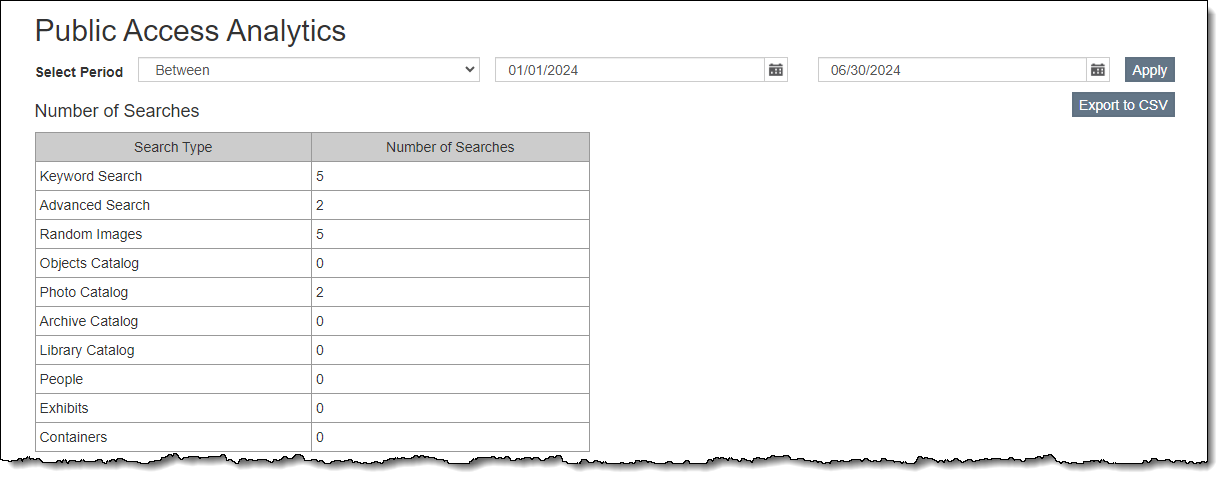
Access Public Site Analytics
1.Go to "Utilities" on the Main Navigation Bar
2.Click "Public Access Analytics"
3.Use the dropdown arrow to select a condition to define the time period for which to run the report
4.Populate the Date or Dates if you selected Between as the condition
•When using the Between condition, set the second date as tomorrow if you want to include today's results.
5.Click the "Apply" button to see the results appear on screen
6.If you wish to export the report, click the "Export to CSV" button at the top
Public Access Analytics Report Sections
Number of Searches
This section displays the nine possible search types available on Public Access sites (Keyword Search, Advanced Search, Random Images, Objects Catalog, Photos Catalog, Archive Catalog, Library Catalog, People, and Exhibits) as well as the number of searches performed for each type of search.
Most common searches
This section will list the most common searches regardless of whether or not they returned results. It displays the Search Type, Parameter (what was searched for), Number of Searches (the number of times that search was performed), and Records found (the number of records matching the search parameters).
Most common searches with zero results
This is a list of the most common searches where no results were returned. The list includes the Search Type, Parameter (what was searched for), and the Number of Searches (the number of times that search was performed). These indicate that the terms web visitors are seeking are not in your online database. This section may help you decide which item to add to your site to improve your visitors' searching experience.
Searches with most results
This list will display the searches that returned the highest number of records. It displays the Search Type, Parameter (what was searched for), Number of Searches (the number of times that search was performed), and Records found (the number of records matching the search parameters).