
Flagging Records
Catalog, Accession, and Contact records have the ability to be flagged for further attention later. The flag is located in the upper right corner of the record, above the Action buttons. When a record has been flagged, the Flag icon will appear in red.
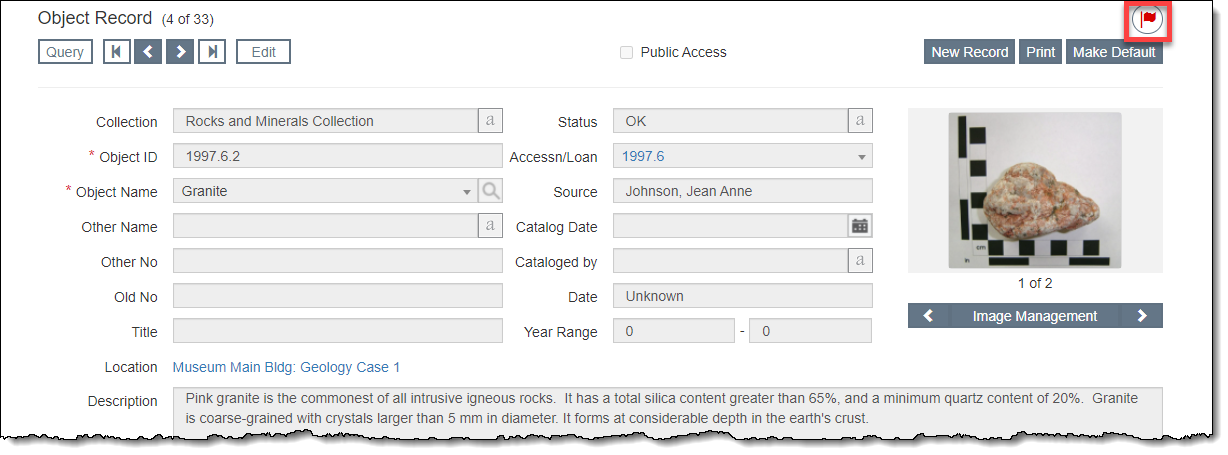
Flag a Record
1.Click "Edit" in the Edit Bar at the top of the record
2.Click the Flag icon
3.Fill in the Flag reason field
•This field is controlled by an authority file (See Using Authority Files)
4.Populate the Flag date and Flag Details fields as needed
5.Click "Save" on the pop-up window
6.Click "Save" in the Edit Bar at the top of the screen
View a Flagged Record
To view a flagged record, click the Flag icon to open the Flagged Records pop-up window. From here you can read the details about why the item is flagged as well as view a list of all of the flagged records. Click the Object ID, Accession No, or Last Name hyperlink to navigate to those records.
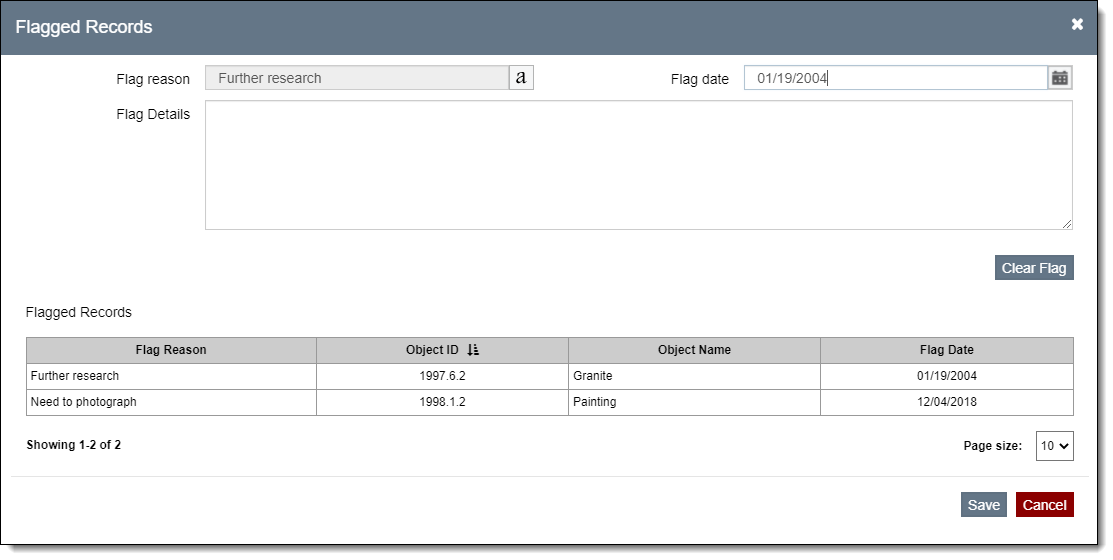
Clear a Flag
1.Click "Edit" in the Edit Bar at the top of the record
2.Click the Flag icon
3.Click "Clear Flag"
4.Click "Yes" to confirm
5.Click "Save" on the pop-up window
6.Click "Save" in the Edit Bar at the top of the screen