
DPLA Export
Organizations with Public Access can share records with the Digital Public Library of America (DPLA). The first step to sharing, is to find your regional Service Hub. Once your data is submitted to your regional Service Hub, they will work to submit it to DPLA. You can find your hub at https://pro.dp.la/hubs/our-hubs.
Public Access users are currently contributing to the following Service Hubs:
Northwest Digital Heritage [Oregon, Washington]
Plains to Peaks Collective [Colorado, Wyoming]
If you fall within the region of one of these Service Hubs, see Generate Files for DPLA Export for the First Time. If you are part of a different Service Hub, our team will need to speak with a representative of your Service Hub. Please have someone from your Service Hub contact our team at webedition@museumsoftware.com.
Generate Files for DPLA Export for the First Time
1.Go to "Utilities" on the Main Navigation Bar
2.Click "DPLA Export"
3.Click the "Generate" button. A loading animation will be displayed, this process may take several minutes.
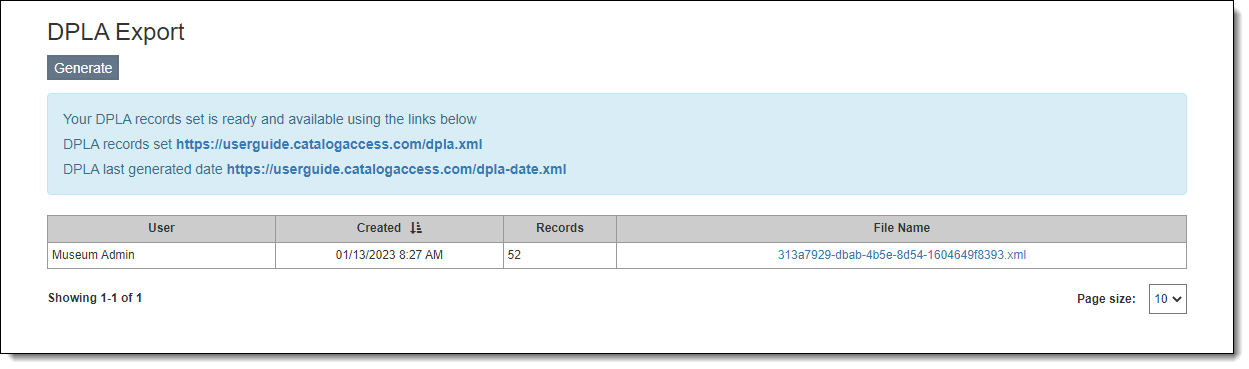
4.When the files have finished generating, you will receive a "Generated Successfully" confirmation message. The screen will also display a blue box containing two URLs. Share both URLs with your Service Hub.
Generate Updated Files for DPLA Export
As you add and update catalog records over time, you will want to update your DPLA Export files periodically. This ensures the next time your Service Hub harvests data, they will be getting the most updated information.
1.Go to "Utilities" on the Main Navigation Bar
2.Click "DPLA Export"
3.Click the "Generate" button. A loading animation will be displayed, this process may take several minutes.
4.When the files have finished generating, you will receive a "Generated Successfully" confirmation message.
•The URLs in the blue box will remain the same and are the ones your hub will always use to ingest your data. The two files are updated to reflect the new data you generated.
•The table below the blue box will also be updated. This table is purely for historical purposes to show information for past exports. There is no need to share the File Name with your hub.
5.If required by your hub, let them know new files are available for harvest. Some hubs perform scheduled harvests and do not need to be informed.