Recycle Bin
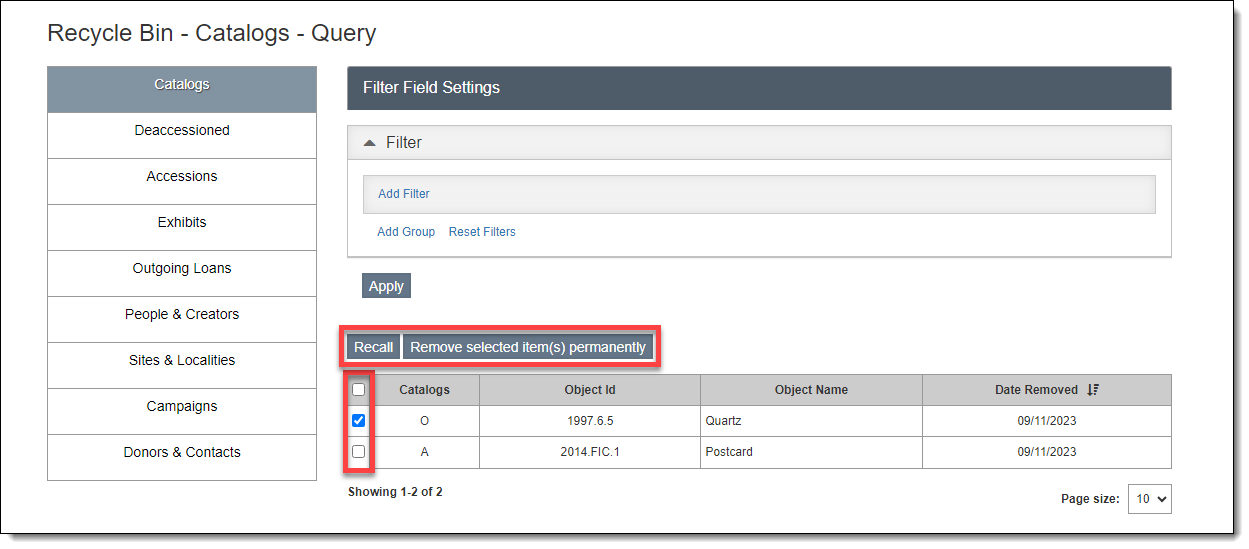
When a record is deleted, the record is moved from the original database into the Recycle Bin. The Recycle Bin Query screen is accessible by going to Utilities | Recycle Bin. The left sidebar has nine sections: Catalogs, Deaccessioned, Accessions, Exhibits, Outgoing Loans, People & Creators, Sites & Localities, Campaigns, and Donors & Contacts.  The Catalogs section includes deleted records from Objects, Photos, Archives, or Library. The Accessions section includes records deleted from Accessions, Incoming Loans, and Temporary Custody.
As with all Query screens, you can use a filter to narrow down the records within a particular section. Each section has its own fields available in the field drop-down list. For more information about query screens, see Collections Query Screens or Development Query Screens.
Recall Record
1.Locate the record you wish to recall
2.Use the checkbox on the left side of the record to select the one(s) you want
3.Click the "Recall" button to return the record to its original location
Permanently Delete Record
Note: These steps will permanently remove a record from your program. There is no way to recall it after using these steps.
1.Locate the record you wish to permanently remove
2.Use the checkbox on the left side of the record to select the one(s) you want
3.Click the "Remove selected item(s) permanently" button to delete the record
4.Click "Yes" on the confirmation message